
Spire Systems has released Version 4.0, delivering a range of enhancements designed to improve productivity, simplify daily operations, and provide users with greater flexibility across accounting, inventory, sales, and mobile processes. The latest release focuses on streamlining workflows, improving data management, and expanding access to information wherever business happens. At the 2026 Partner Conference, Spire partners were provided with an exclusive look at new features and functionality.
After testing out Version 4.0 and reviewing Spire's release notes, we have summarized below some of the key new features (Spire System's notes and demonstration video can be viewed on their website here):
Smarter Accounting and Financial Management
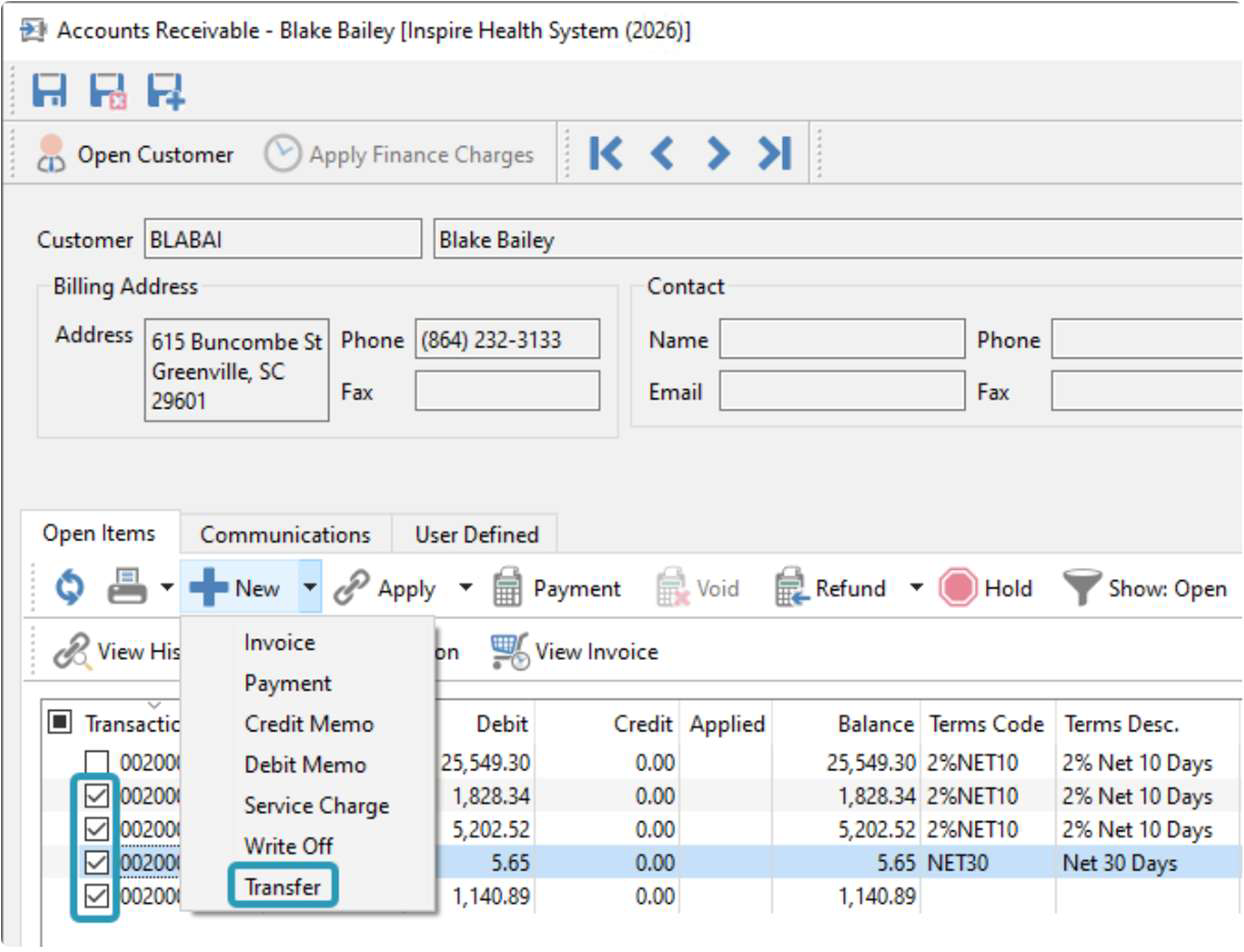
One of the key improvements in Version 4.0 is the addition of contra entries for Accounts Receivable and Accounts Payable, allowing businesses to offset customer and vendor transactions more efficiently. This enhancement helps reduce manual work and simplifies account reconciliation processes.
Spire 4.0 also introduces support for multiple CRA accounts, providing greater flexibility for organizations that require separate reporting or submission processes for different tax accounts.
Improved System Performance and Data Management
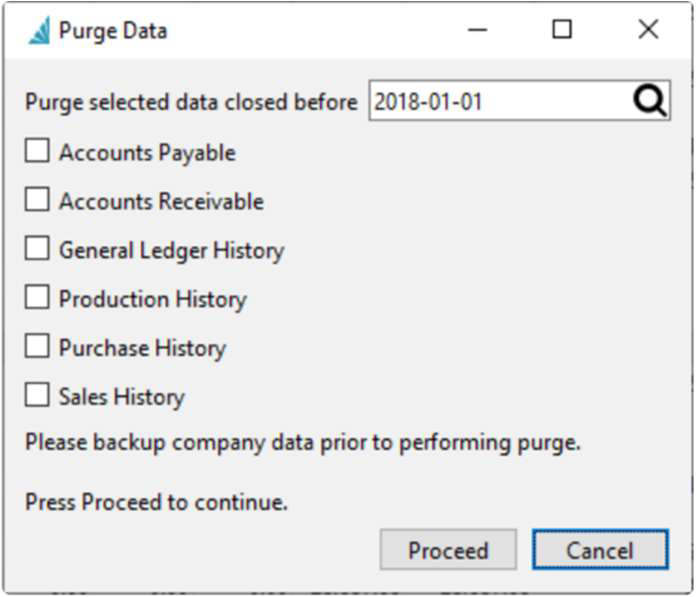
As databases grow over time, system performance can be impacted by historical records. To address this, Version 4.0 includes a new Purge Data function that allows businesses to remove older historical transactions. This helps reduce database size and can improve both search and reporting performance.
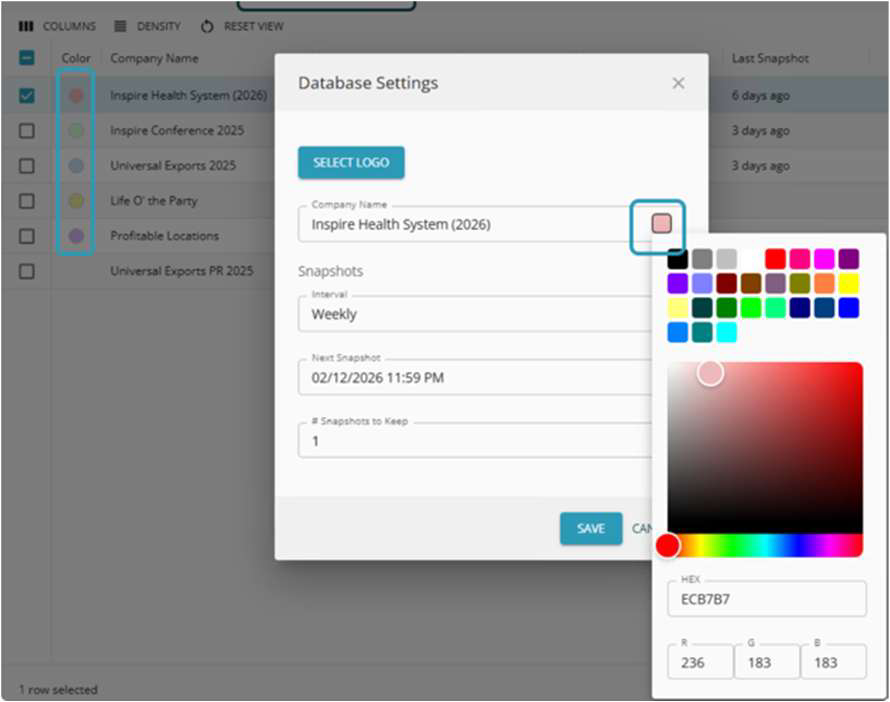
For organizations managing multiple companies within Spire, administrators can now configure company colours and customize company sign-on sequencing, making it easier for users to identify the correct company and quickly access their most frequently used databases.
Enhanced Inventory and Sales Visibility
Inventory management receives several important upgrades in Spire 4.0. Vendor pricing information is now available on a dedicated tab within the Inventory module, giving users faster access to supplier pricing details and improving purchasing decisions.
In the Sales module, customer billing and shipping user-defined fields (UDFs) can now be loaded directly into sales orders, making important customer information more accessible and improving customized reporting capabilities.
A More Organized User Experience
Spire Version 4.0 introduces a refined interface structure with modules reorganized for easier navigation. History and supplemental modules are now presented as tabs within their related primary modules, helping users find information more quickly and reducing screen clutter.
Expanded Mobile and Web Capabilities
A major highlight of Version 4.0 is the expansion of Spire Web functionality. Users can now take advantage of a new Point of Sale (POS) module, designed with improved usability and mobile device support.
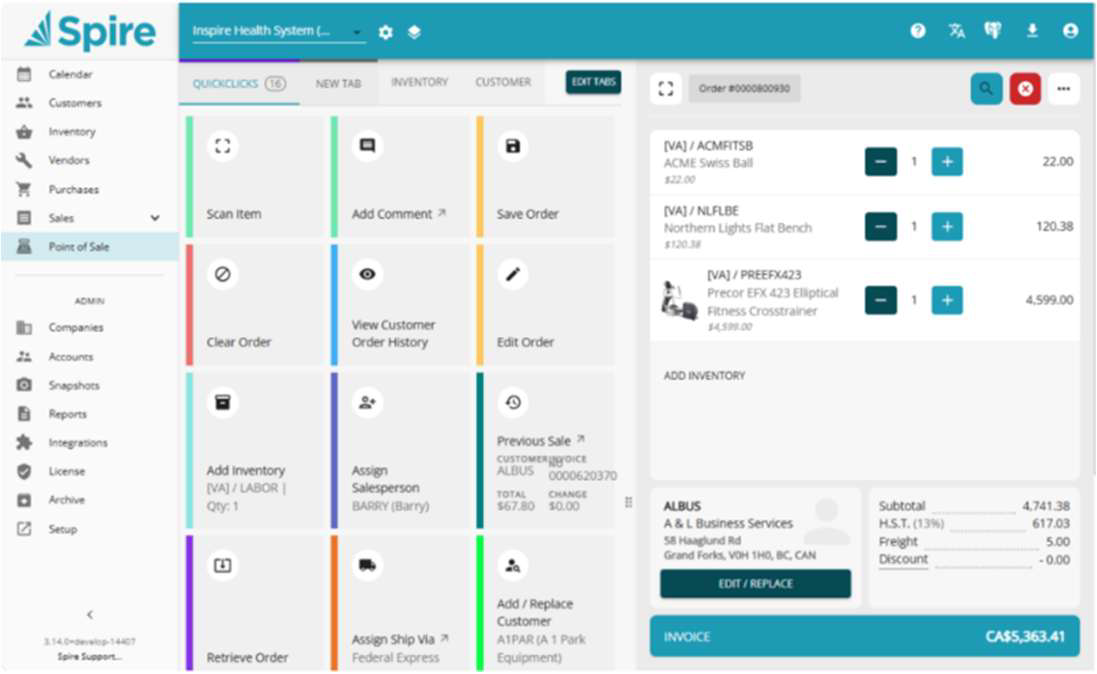
Additional web enhancements include:
- Inventory count entry with mobile scanning support
- Access to Communications, Notes, and Calendar information
- Ability to create new notes directly through the web interface
- Improved access to business information while working remotely or on the go
Selection of Other Spire 4.0 Features
General Ledger Module
- Add Bank Account column to GL Account List
- Move Budgets and Forecasts into a General Ledger module tab
- Add Communication tab to GL Account Reconciliation
Inventory Module
- Add Vendor Prices tab to show all vendors, all prices
- Move Price Matrix into an Inventory module tab
- Consolidate all options for Inventory multi edit to one screen
- Add audit columns to Inventory, Sales Department List
- Add Minimum Order quantity to Inventory multi edit
- Add Details to Locked record message during multi edit, indicating Part Number
Payroll Module
- Add support for Mail Merge to Employees
- Add ability to have multiple RP accounts for CRA, set in Payroll Departments for Employees, T4, T4A, T5018 and ROE form selection
- Automatically generate Payroll Schedule description for the date range
Purchases Module
- Move Purchase History into a Purchases module tab
Sales Module
- Add Copy button to Sales History List
- Move Sales History into a Sales module tab
- Add maximum discretionary discount to Edit User and respect on Sales Order line
- Add ability to import Sales History Invoices in Import tool
- Add UDF flags to copy Customer UDF data to a new Sales Order
Why Upgrade to Spire 4.0?
Version 4.0 continues Spire's commitment to helping growing businesses improve efficiency, increase visibility, and streamline operations.
With enhanced accounting capabilities, stronger inventory tools, improved performance, and expanded mobile functionality, Spire 4.0 provides practical improvements that can benefit users across every department.
As businesses continue to demand greater flexibility and real-time access to information, Spire Version 4 delivers the tools needed to stay productive, informed, and competitive.
Ready to learn more about Spire Version 4.0? Contact us today to discuss how these new features can help your organization maximize efficiency and get even more value from your ERP investment.
This article first appeared in Vantage Point, the Resounding Software newsletter (Fall 2026).